Microsoft has always been good at pushing its ecosystem forward—but lately, the Power BI and Fabric transition feels less like progress and more like a forced march. As someone who has built solutions on Power BI, I’m used to change. I’m not opposed to new features, new paradigms, or even new licensing models. But what I am opposed to is confusion, broken workflows, and a user experience that seems intentionally designed to funnel customers into a paid Fabric capacity whether they need it or not.
And right now, that’s exactly what it feels like.
The Disappearing Act: Dataflows Gen1
Let’s start with the most immediate pain point: Dataflows Gen1.
In the new Power BI UI, Dataflows Gen1 has been buried so deeply it feels like Microsoft doesn’t want you to find it at all. It’s been slapped with a “legacy” label, but here’s the kicker—there is no viable alternative for customers who don’t have Fabric capacity.
If you’re not paying for Fabric, your choices are:
- Keep using Gen1 (if you can find it)
- Or… nothing
That’s not a transition plan. That’s a dead end.
And it’s not just an inconvenience. Many organizations—especially smaller teams or those with strict governance—depend on Dataflows Gen1 for ETL pipelines, scheduled refreshes, and shared semantic logic. These aren’t “nice to have” features. They’re foundational.
“You Can See Fabric, But You Can’t Touch It”
Microsoft’s documentation doesn’t help either. In fact, it often makes things worse.
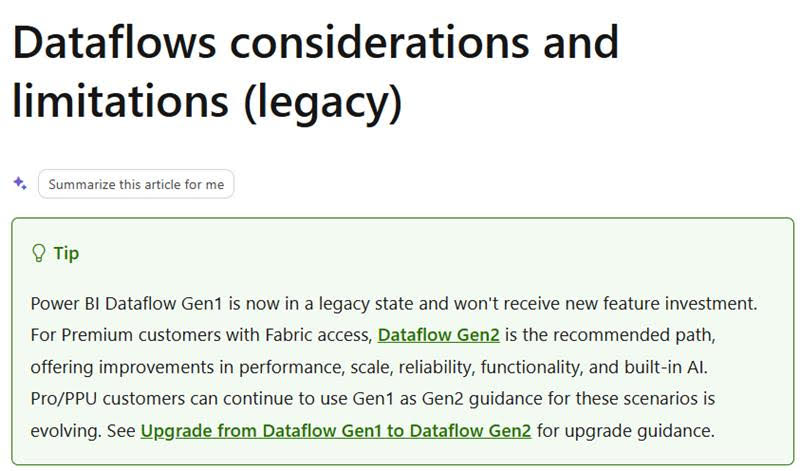
Take this line, which Copilot summarized perfectly:
“Premium customers with Fabric access”
Sounds straightforward, right? Except it’s not.
What this really means is:
- Your tenant can enable Fabric
- Your users can see Fabric features and UI
- But you cannot actually use those features unless your workspace is backed by Fabric capacity
So you get the illusion of access—buttons, menus, and options everywhere—but the moment you try to do anything meaningful, you hit a wall. It’s like being invited to a showroom where everything is behind glass.
This is not clarity. This is marketing.
The Real Problem: A Transition Without a Bridge
Microsoft’s own documentation highlights the limitations of Dataflows Gen1 and Gen2, but it also unintentionally exposes the core issue: there is no smooth migration path for customers who aren’t ready—or able—to adopt Fabric capacity.
Just look at the official limitations page: https://learn.microsoft.com/en-us/power-bi/transform-model/dataflows/dataflows-features-limitations
A few standout realities:
- Gen1 and Gen2 have different capabilities, not a clean superset
- Gen2 requires Fabric capacity for many features
- Some Gen1 features simply don’t exist in Gen2
- Certain connectors, transformations, and refresh behaviors differ
- Not all workloads migrate cleanly—or at all
This isn’t a “new version.” It’s a different product with different rules, different infrastructure, and different licensing.
And Microsoft’s answer to all of this seems to be: “Just buy Fabric.”
The Pressure to Upgrade Is Not Subtle
Let’s be honest: Microsoft is nudging—no, pushing—users toward Fabric capacity.
How?
- By hiding Gen1
- By labeling it “legacy” without offering a replacement
- By surfacing Fabric UI to everyone, even those who can’t use it
- By making documentation vague enough to imply access you don’t actually have
- By tying core data transformation features to a capacity SKU many organizations don’t need
This isn’t a natural evolution. It’s a funnel.
And it’s frustrating because Power BI has always been a tool that scaled down as well as up. It empowered small teams, individual analysts, and organizations without enterprise budgets. Fabric, in its current form, breaks that promise.
What Microsoft Needs to Fix
If Microsoft wants this transition to succeed—and avoid alienating a huge portion of its Power BI user base—it needs to address three things:
1. Clear, honest documentation
Spell out exactly what users can and cannot do without Fabric capacity. No more ambiguous phrasing.
2. A real migration path
If Gen1 is “legacy,” then Gen2 must be accessible to everyone—or there must be a supported alternative.
3. A UI that reflects actual capabilities
Don’t show features users can’t use. Don’t bury the ones they rely on.
Why This Matters
Power BI became a market leader because it was accessible, flexible, and transparent. Fabric has enormous potential—but right now, the rollout feels rushed, confusing, and dismissive of existing customers.
I’m not against Fabric. I’m against being forced into it without a plan.
Until Microsoft provides a clear path forward, many of us will be stuck in limbo—trying to maintain “legacy” solutions while staring at shiny new features we can’t touch.
And that’s not innovation. That’s friction.